
OS1 vs OS2 Fiber: Which Single-Mode Type to Install
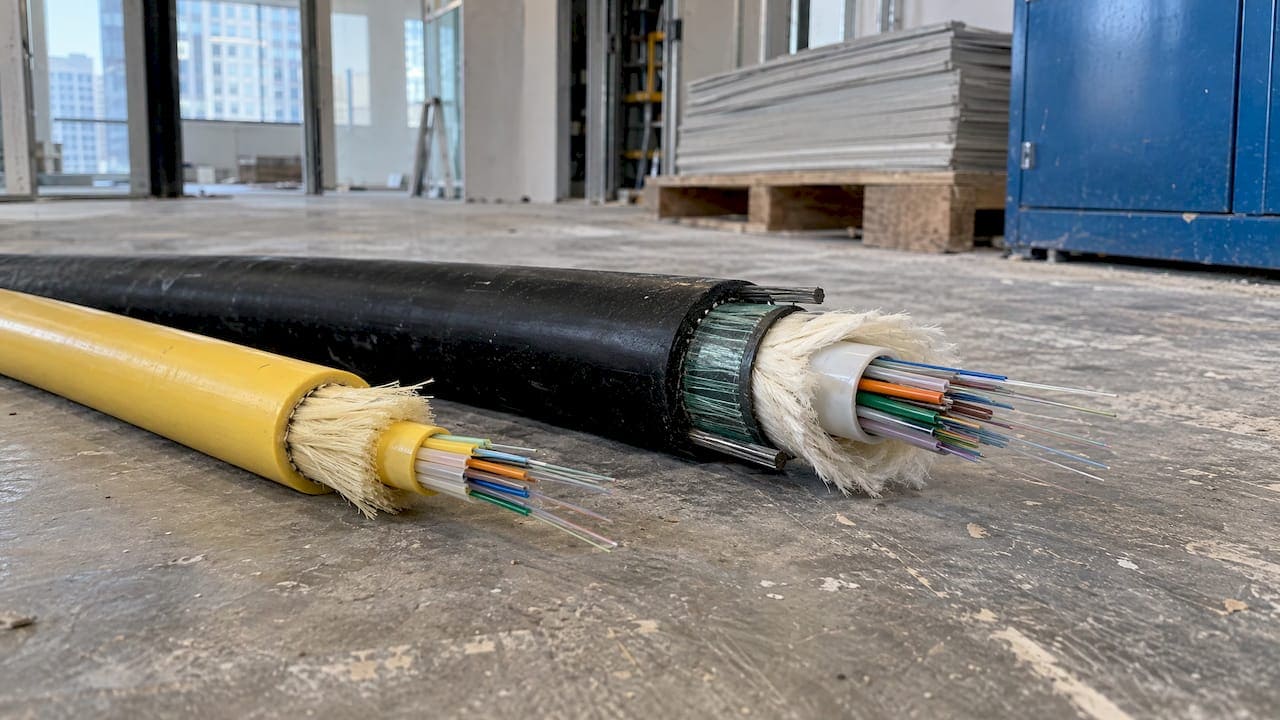
OS1 and OS2 are both single-mode fiber with the same 9 µm core. The difference is the cable around it and the loss it allows. OS1 is tight-buffered indoor cable rated at 1.0 dB/km. OS2 is typically loose-tube cable rated at 0.4 dB/km, built for outside plant and long runs. For a commercial building the practical answer is this: use indoor-rated single-mode inside the riser and the telecom room, use OS2 wherever a run leaves the building or crosses a campus, and ask for low-water-peak fiber so the backbone can grow. We install and certify both as part of our fiber installation work in NYC, and the specification decision below is the one we help project teams make before a single cable is pulled.
TL;DR
- OS1 and OS2 are both single-mode fiber with a 9 µm core, so they use the same connectors and the same optics. The FOA’s premises reference lists OS1 at a maximum of 1.0 dB/km and OS2 at 0.4 dB/km, at 1310 nm and 1550 nm.
- OS1 is the indoor, tight-buffered type. OS2 is the outside-plant type, usually loose-tube, and it is the one to specify between buildings and for any run beyond a few kilometers.
- Inside a building, the cable length is short enough that attenuation rarely decides the outcome. Connector count, cleanliness, bend radius and testing do.
- Current TIA guidance recommends low-water-peak single-mode fiber for new installations, which is what you want when planning for wavelength multiplexing later.
- Whatever you choose, have the links tested and documented at turnover.
What OS1 and OS2 actually are
Both names come from the cabling standards, and both describe single-mode fiber: a glass core of about 9 microns that carries one light path. The FOA notes that single-mode core sizes are specified as a mode field diameter of 8 to 10 microns inside 125 micron cladding. OS2 is single-mode, not multimode. If you see a cable marked OM1 through OM5, that is the multimode family, and it is a different decision.
The “OS” stands for optical single-mode. The number separates two cable classes defined by how the cable is built and how much loss it is allowed to add per kilometer:
- OS1 is single-mode fiber for premises use. It is generally built as tight-buffered cable, where each fiber has a snug plastic coating inside the jacket. That makes it flexible and easy to terminate inside risers, plenums and telecom rooms.
- OS2 is single-mode fiber for outside plant. It is generally built as loose-tube cable, where fibers float in gel-filled or dry water-blocked tubes, so the cable can expand, contract and be pulled in conduit without stressing the glass.
The jacket rating still matters. Where cable runs through a building, the jacket has to meet the fire-rating requirement for the space (riser, plenum or general purpose), and outdoor loose-tube cable often needs a transition to indoor-rated cable shortly after it enters the building. That is a code and construction detail your installer should plan for in the design, not something to find out at rough-in.
OS1 vs OS2 side by side
| OS1 | OS2 | |
|---|---|---|
| Core and cladding | 9/125 µm single-mode | 9/125 µm single-mode |
| Maximum cabled attenuation | 1.0 dB/km at 1310 nm and 1550 nm | 0.4 dB/km at 1310 nm and 1550 nm |
| Typical construction | Tight-buffered | Loose-tube |
| Typical setting | Inside plant: risers, data rooms, short-haul LAN | Outside plant: campus, between buildings, long-haul |
| Connectors | LC, SC and other standard single-mode types | Same |
| Transceivers | Standard single-mode optics | Same |
The attenuation figures come from the FOA’s structured cabling table. The tight-buffered versus loose-tube split is a convention, not a law of physics. You will find loose-tube cable rated for indoor-outdoor use, and tight-buffered cable with OS2-grade performance. That is why you specify by attenuation and jacket rating, not by the label alone.
What the standards say now
The standards have moved. TIA’s fiber committee recommends three 9 µm single-mode types for new installations:
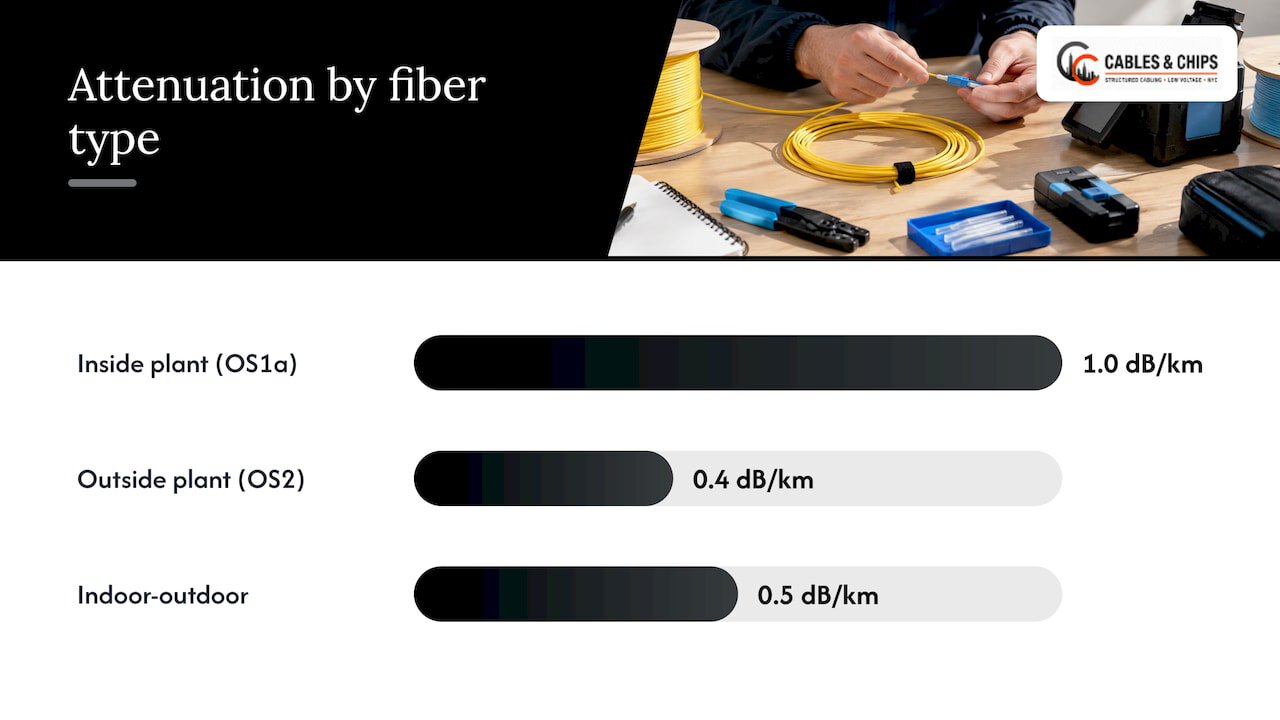
- Inside plant (OS1a) at 1.0 dB/km, for indoor and short-haul LAN, data center, enterprise and fiber-to-the-X applications.
- Outside plant (OS2) at 0.4 dB/km, for long-haul networks.
- Indoor-outdoor at 0.5 dB/km, for runs between buildings and mid-haul metropolitan links.
The same TIA update says all three are characterized as low-water-peak fiber. In plain terms, the fiber does not suffer high loss in the 1360 to 1460 nm band caused by water ions in the glass. That matters for wavelength-division multiplexing, which puts several wavelengths on one fiber to multiply capacity. If you may want that later, you want low-water-peak glass in the ground now.
Two other points from the standards trail are worth knowing. Belden’s summary of ANSI/TIA-568.3-D says the standard labels legacy OM1, OM2 and OS1 as not recommended for new work, and lowers the allowed loose-tube OS2 attenuation from 0.5 to 0.4 dB/km. So when a drawing says “OS1” today, the better question to ask is whether the specifier means current low-water-peak inside plant fiber or an older product. If you want the wider context, our TIA standards compliance guide walks through how those standards apply to a structured cabling job.
How far can you run OS1 or OS2?
Published reach figures you will see online (10 km for OS1, up to 200 km for OS2) are category limits, not guarantees. The usable distance of any single-mode link is set by three things:
- the optics at each end, which have their own transmit power and receiver sensitivity,
- the fiber attenuation over the length, and
- everything else in the path: every connector pair, every splice, every patch panel and any passive splitter.
Standards-based 10 km optics such as 10GBASE-LR, 40GBASE-LR4 and 100GBASE-LR4 are designed around single-mode fiber, and the optics decide the rated reach. Very long OS2 systems need equipment built for that reach, sometimes with amplification. For an office building, none of that is the constraint. The constraint is the loss budget.
A worked example
Take a 2 km link between two buildings, using the maximum attenuation values above:
- OS1 at 1.0 dB/km: 2 km × 1.0 = 2.0 dB of fiber loss.
- OS2 at 0.4 dB/km: 2 km × 0.4 = 0.8 dB of fiber loss.
OS2 leaves 1.2 dB more margin before you add a single connector. Now add connectors. If each mated connector pair is budgeted at 0.75 dB, a link with two pairs adds 1.5 dB. Belden’s link budget discussion argues that cutting per-connection loss from 0.75 dB to 0.5 dB, together with the OS2 change to 0.4 dB/km, is what makes more flexible 500 m and 2 km architectures workable.
Now the same arithmetic inside a building. A 300 m riser run at 1.0 dB/km is 0.3 dB of fiber loss. At 0.4 dB/km it is 0.12 dB. The difference is 0.18 dB. A single dirty or poorly polished connector can cost more than that. Inside a typical NYC office tower or floor-to-floor backbone, connector quality and cleanliness decide link performance far more than the OS1 or OS2 label.
That is why we treat the loss budget as a design document, not an afterthought. For the testing side, see our explanation of optical loss testing with OLTS and OTDR.
Where each one belongs in a commercial project
Inside the building
Riser backbones, connections between the MDF and IDFs, links to a server rack and fiber to a floor distribution point are the home of indoor-rated single-mode. Tight-buffered cable terminates cleanly, routes tightly and is easier to work in a crowded telecom room. Inside plant fiber is the right basis for the fiber backbone in most office designs, and it is covered in our fiber optic backbone office design guide.
Between buildings and out to the street
Any run that leaves the building envelope, crosses a campus, goes through conduit underground or sees temperature swings belongs on OS2 or an indoor-outdoor rated cable. The loose-tube construction handles pulling tension and moisture, which is what outside plant demands. This also applies to service entrance fiber, where the cable has to be transitioned to an indoor-rated type at the point of entry.
Long runs and wavelength multiplexing
Once a link approaches 10 km, or when you plan coarse or dense wavelength multiplexing, OS2 low-water-peak fiber is the specification. It is also the safer default when you are not sure what the building will need in ten years, since single-mode fiber lets you raise speeds by changing optics, not cable. The FOA points out that larger data centers focus on single-mode for exactly this reason.
Single-mode or multimode, or copper?
OS1 and OS2 only answer the single-mode question. Many offices still run multimode in the building and copper to the desk. If the broader question is fiber against copper for a particular backbone or floor, our CAT6A vs fiber optic decision guide covers it.
Can you mix OS1 and OS2?
Yes, with care. Both are 9 µm core fiber, so they are physically compatible with the same single-mode connectors and the same optics. A 10G single-mode transceiver at 1310 or 1550 nm will work over either type, and the fiber’s loss and the total link budget set the achievable distance. Bend-insensitive G.657 fiber is compliant with G.652.D, so it can be spliced to standard single-mode without excessive loss, according to CommScope’s technical note. Some fusion splicers have trouble identifying it and may need to be set to cladding alignment.
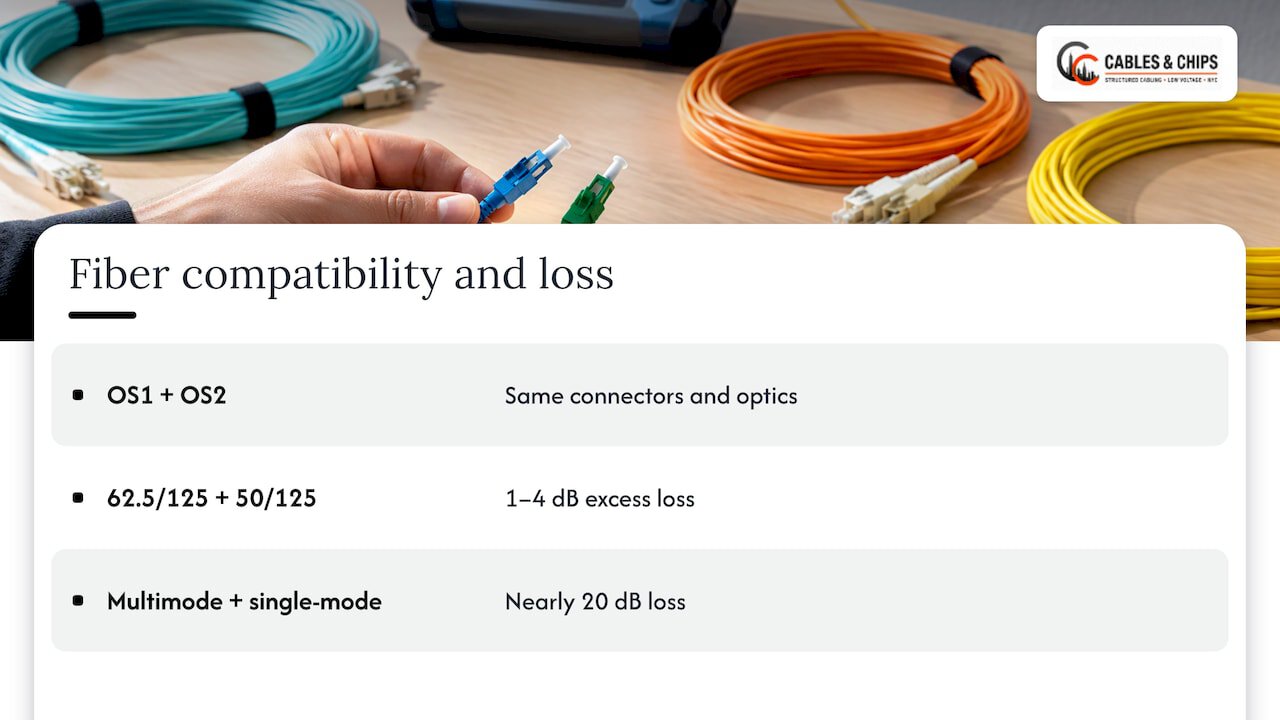
The things you must not mix are the fiber families. The FOA’s 2025 installation standard warns that fibers with different core diameters are not compatible. Connecting 62.5/125 to 50/125 multimode can add 1 to 4 dB of excess loss, and connecting multimode to single-mode can lose nearly 20 dB. The same document says cable type should be positively identified by jacket markings, including each fiber type in hybrid cables, since multimode and single-mode are terminated differently.
In practice, a mixed OS1 and OS2 path is common: OS2 outside plant spliced or patched into indoor single-mode at the building entrance. The rule is to add up the loss of every segment, every splice and every connector, and then test the finished channel end to end.
Bend radius and tight spaces
NYC telecom rooms are small, and cable often turns corners in them. TIA recommends optional bend-insensitive fiber, with a lower-index coating, when cables must support bend radii under 1 inch (25 mm), per the same TIA update. The FOA’s installation standard adds that G.657 is the bend-insensitive variant and that much regular G.652 is now close to G.657.A1 in bend behavior. If your riser or closet layout is cramped, say so in the specification. It changes the fiber we recommend and how the slack is stored.
How to specify it: a checklist for your project
Whether you are an IT director planning a move, a general contractor coordinating trades or an architect drawing a telecom room, this is the information the cabling scope needs:
- Route and environment. Does any segment leave the building, run through conduit or see outdoor conditions? If yes, specify OS2 or indoor-outdoor cable for that segment.
- Longest link. State the physical length and the optics you plan to use. Short building links are not attenuation-limited.
- Future wavelengths. If you may use multiplexing, specify low-water-peak single-mode throughout.
- Connector and splice plan. Count the mated pairs. Decide between pre-terminated assemblies and field termination. Our fiber termination methods guide explains the options, and our MPO vs LC comparison covers the high-density question.
- Jacket rating. Riser, plenum or general purpose, matched to each space, with transitions planned at entrances.
- Bend conditions. Flag tight closets so the fiber type and slack storage can be chosen for them.
- Testing and documentation. Require loss test results per link and a labeled, documented patch panel and closet at turnover.
Common mistakes on OS1 and OS2 jobs
- Treating the label as the whole spec. “OS2” says nothing about jacket rating or connector quality. Specify attenuation, construction, jacket and termination.
- Assuming OS1 is limited to 10G. The label does not cap the speed. Optics and the loss budget do. A single-mode link built well can be upgraded by changing the transceivers.
- Assuming OS2 means outdoor only. It is the outside-plant specification, but the same fiber is available in forms that fit indoor routes.
- Ignoring the connectors. Contamination and poor terminations cause more trouble than the fiber grade.
- Skipping end-to-end testing. A reel’s datasheet describes the cable, not your installed channel.
- Leaving the telecom room undocumented. Unlabeled fiber is hard to trace and expensive to change later.
Why the installer matters more than the fiber grade
The gap between OS1 and OS2 is a few tenths of a decibel per kilometer. The gap between a clean, tested, documented installation and a poor one is often several decibels, and it shows up as intermittent errors, links that fail when optics are swapped and rooms nobody wants to open. Fiber is the part of a network you want to install once.
That is where a contractor with the right habits earns its keep: correct cable selection per segment, controlled bend radii, clean terminations, a link-by-link test record and tidy MDF and IDF closets. With the building owner, the GC and the IT team all depending on the same backbone, the paperwork matters as much as the glass.
Our perspective
We have worked on commercial networks in New York City for more than 40 years, and the OS1 versus OS2 question comes up on almost every fiber scope. Our view is simple: choose the fiber by the route, not by the label.
Inside the building, use indoor-rated single-mode and put the effort into terminations, bend control and labeling. Where the run leaves the building, specify OS2 or an indoor-outdoor cable with the right jacket transition. Where growth is likely, choose low-water-peak fiber so the backbone can carry more without being pulled again.
Then test every link and hand over the results with a documented, organized closet. That is how we approach fiber installation, testing and certification, and it is why we encourage a site survey before the specification is locked. The cable is a small part of the cost. The rework is not.
Ken
Plan your fiber with a site survey
Cables & Chips is a licensed and insured low voltage contractor at 20 Vesey Street in Lower Manhattan. We design, install, test and certify fiber for commercial offices, secure facilities and enterprise environments across New York City, and we offer a no-obligation site survey so the OS1, OS2 and routing decisions are made against your actual building.
If you are scoping a backbone, a building-to-building link or a closet rebuild, see our fiber installation services or the full list of services and schedule a site survey.
FAQ
Is OS2 multimode or single-mode?
OS2 is single-mode fiber. The FOA’s standards table lists it with a 0.4 dB/km maximum attenuation at 1310 nm and 1550 nm. Multimode fiber uses the OM designations (OM1 to OM5), not OS.
How far can you run OS2 fiber?
The category is often quoted at up to 200 km, but the real distance depends on the optics and the total link loss, including every connector and splice. Standard 10 km optics work over OS2, and longer systems need equipment designed for that reach. For an office or campus link, a loss budget calculated for your exact path is the number that matters.
Can you mix OS1 and OS2 fiber?
Yes. They share a 9 µm core, so the connectors and transceivers are the same, and you can join them in one path. Add up the loss of every segment and connector and test the finished link. What you cannot mix is single-mode with multimode, which can cost nearly 20 dB at the joint, per the FOA.
Should I choose OS1 or OS2 for an office riser?
For a riser or MDF-to-IDF link inside the building, indoor-rated single-mode is the usual choice, and the loss difference over such short lengths is small. Choose OS2 or an indoor-outdoor cable for anything that leaves the building. If you want the backbone to support wavelength multiplexing later, specify low-water-peak fiber throughout.
Do I need to test new single-mode fiber?
Yes. Testing the installed link confirms its loss against the budget and gives you a record for the building. We offer cable testing and certification with fiber installation, and our optical loss testing guide explains the methods.
Sources
- IEEE 802.3 Single-mode Optical Fiber Ethernet Standards Update, TIA FOTC
- The FOA Reference for Fiber Optics: Fiber Optics in Premises Cabling
- FOA Installation Standard 2025 V1
- Checkpoint No. 3 for Fiber Infrastructure Deployment, Belden
- Checkpoint No. 4 for Fiber Infrastructure Deployment, Belden
- Dispelling Tight Buffered Misconceptions, CommScope